

4 Best Google Voice Alternatives for Small Teams (To Share One Phone Number)
Daniel Zvi
 153
153

If you're a small business owner who's frustrated with Google Voice because multiple team members can't easily call and text from the same number, the best option right now is Vonage — it provides a shared team inbox where multiple staff members can reply to customer text messages and calls from one centralized business number.
TL;DR
- Vonage — Best for heavy SMS texting teams: Vonage provides a shared team inbox where multiple staff members can reply to customer text messages from one centralized business number.
- RingCentral — Best for scaling teams with complex routing: RingCentral offers advanced shared line appearances and call delegation, allowing a small team to manage high call volumes from a single main number.
- Zoom Phone — Best for teams already using Zoom: Zoom Phone integrates a shared business number directly into the video meeting app your team is already using every day.
- Ooma Office — Best for straightforward shared ringing: Ooma Office allows multiple employees to share a single business number with customizable ring groups so no customer call goes to voicemail.
Is Vonage a Good Google Voice Alternative for Small Teams to Share One Phone Number?
Who is Vonage actually for?
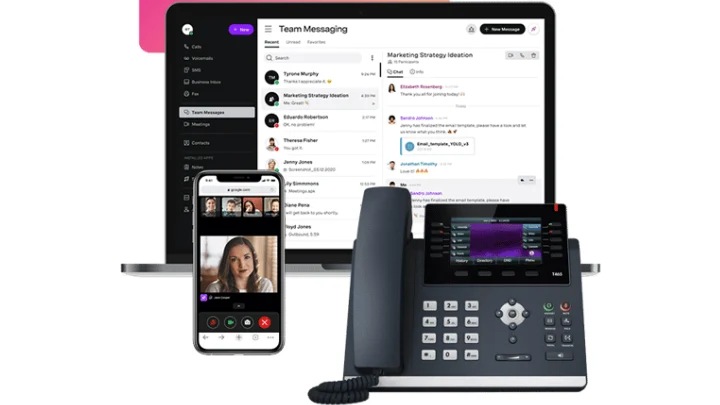
Vonage is built for customer-facing teams who need a shared inbox for calls and texts and want to avoid scattered, unorganized customer communications. It gives sales and support teams a unified workspace where anyone can jump in and reply to a client. It's highly customizable for teams that want to integrate their shared number with a CRM.
 Our top picks for October 2026
 9.3
9.3


 Voice, video & text collab.
Why would you switch from Google Voice to Vonage?
Vonage is worth switching to if you rely heavily on texting, because it offers a unified team inbox where multiple people can view and reply to SMS from one number — something Google Voice actively restricts to prevent spam. Your whole team gets visibility into the entire conversation history with a client.
What can Vonage actually do for small teams?
- Shared SMS Inbox: Allows multiple staff members to read and respond to text messages sent to your main business number.
- Call Queues: Lines up incoming callers and routes them to the next available team member sharing the line.
- CRM Integrations: Logs every call and text from the shared number directly into Salesforce, HubSpot, or Zendesk.
- Business Inbox: Consolidates Facebook Messenger, SMS, and WhatsApp messages into one shared team view.
How much does Vonage cost?
Vonage costs $19.99/user/month for the Mobile plan. A 14-day free trial is available. It requires a slightly higher investment than Google Voice, but it unlocks massive capabilities for team-based texting.
→ See our full Vonage review or visit Vonage.
Is RingCentral a Good Google Voice Alternative for Small Teams to Share One Phone Number?

Who is RingCentral actually for?
RingCentral is built for growing businesses that need advanced shared number routing and want to avoid outgrowing their phone system in six months. It's a powerhouse platform that handles high-volume call environments with ease. Small teams can use it to look and operate like a massive enterprise from day one.
Our top picks for October 2026

Why would you switch from Google Voice to RingCentral?
RingCentral is worth switching to if you are dropping customer calls, because it provides advanced multi-level auto attendants to route calls to the exact right team member's shared group — something Google Voice simply doesn't have the architecture to support. You get complete control over who rings, when, and in what order.
What can RingCentral actually do for small teams?
- Advanced Call Routing: Directs incoming calls to specific shared groups based on time of day or caller ID.
- Shared Lines: Enables multiple desk phones or apps to share the exact same extension and outbound number.
- Call Flip: Lets team members seamlessly move an active shared-line call from a desktop to a mobile phone.
- Team Messaging: Provides a built-in Slack alternative for employees to coordinate while answering shared calls.
How much does RingCentral cost?
RingCentral costs $20/user/month for the Core plan (when billed annually). There is a 14-day free trial. It's the most robust option on this list, making it ideal for teams that want to completely abandon the limitations of Google Voice.
→ See our full RingCentral review or visit RingCentral.
Is Zoom Phone a Good Google Voice Alternative for Small Teams to Share One Phone Number?
Who is Zoom Phone actually for?
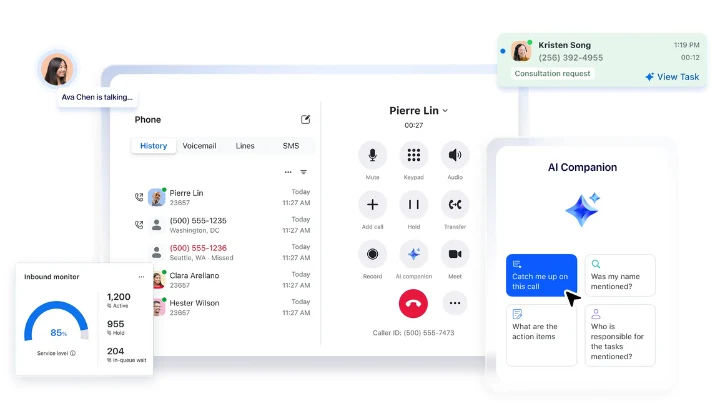
Zoom Phone is built for remote teams who need a shared business number and want to avoid installing yet another standalone communication app. It bolts a full cloud phone system directly onto the Zoom interface everyone already uses. It's perfect for distributed teams that want voice, video, and team chat in one single window.
Our top picks for October 2026

Why would you switch from Google Voice to Zoom Phone?
Zoom Phone is worth switching to if you hate juggling multiple apps, because it integrates shared call delegation right into the Zoom desktop and mobile client — something Google Voice can't do natively outside the Google Workspace ecosystem. Teams can easily transfer calls or place them on hold for another team member to pick up.
What can Zoom Phone actually do for small teams?
- Call Delegation: Allows assistants or team members to make and receive calls on behalf of a shared main number.
- Shared Line Appearance: Lets everyone see if the main shared number is currently in use or on hold.
- Unified Interface: Keeps all shared calls, voicemails, and SMS messages inside the main Zoom application.
- Call Recording: Captures audio from shared line interactions for training and quality control.
How much does Zoom Phone cost?
Zoom Phone costs $10/user/month for the US & Canada Metered plan. There is no free trial available. This makes it a highly affordable step up from Google Voice, especially if you already pay for Zoom Workplace.
→ See our full Zoom review or visit Zoom Phone.
Is Ooma Office a Good Google Voice Alternative for Small Teams to Share One Phone Number?

Who is Ooma Office actually for?
Ooma Office is built for small teams who need a shared phone number and want to avoid the complex setup of enterprise phone systems. It provides traditional small-business phone features, such as ring groups and virtual receptionists, out of the box. You don't need an IT degree to get multiple desk phones or mobile apps ringing simultaneously.
Our top picks for October 2026

Why would you switch from Google Voice to Ooma Office?
Ooma Office is worth switching to if your team misses customer calls, because it lets multiple devices ring simultaneously from a single shared number — something the free version of Google Voice doesn't handle reliably. You get proper business routing so the first available team member can always answer.
What can Ooma Office actually do for small teams?
- Ring Groups: Rings multiple employees at once or sequentially when a customer dials your main number.
- Virtual Receptionist: Greets callers and automatically routes them to the right team member.
- Mobile App: Lets your team answer shared business calls directly from their personal cell phones.
- Voicemail to Email: Sends audio files of missed calls to a shared inbox so anyone can follow up.
How much does Ooma Office cost?
Ooma Office costs $19.95/user/month for the Essentials plan. There is no free trial, but their physical hardware is often deeply discounted. While it isn't free like basic Google Voice, it provides actual business-grade shared lines that Google lacks.
→ See our full Ooma Office review or visit Ooma Office.
Comparison Table
| Alternative | Best For | Starting Price | Shared Inbox Feature | Free Trial? |
| Vonage | Heavy SMS texting teams | $19.99/mo | Shared SMS Team Inbox | Yes (14 days) |
| RingCentral | Scaling teams with complex routing | $20.00/mo | Multi-level Auto Attendants | Yes (14 days) |
| Zoom Phone | Teams already using Zoom | $10.00/mo | Call Delegation | No |
| Ooma Office | Straightforward shared ringing | $19.95/mo | Basic Ring Groups | No |
FAQ
Q: Can multiple people use the same Google Voice number?
A: You can link multiple devices to a single free Google Voice number, but it doesn't function as a true shared business inbox. If one person is on the line, others cannot use that number to make outbound calls, and text messages aren't easily synced or assigned among team members.
Q: Can I port my existing Google Voice number to a new provider?
A: Yes, you can port your Google Voice number to alternatives like Vonage, RingCentral, Zoom Phone, or Ooma. You will need to "unlock" the number inside your Google Voice settings first, which usually costs a one-time fee of $3.
Q: Which Google Voice alternative is best for sharing SMS text messages?
A: Vonage is widely considered the best option for shared SMS because it offers a dedicated team inbox. This allows multiple employees to see incoming text messages, reply from the main business number, and view the entire conversation history, preventing duplicate replies.
Q: Do I need to buy new desk phones to switch from Google Voice?
A: No, you don't need to buy physical desk phones to switch providers. Every alternative on this list offers desktop and mobile applications that allow you to make and receive shared-number calls directly from your existing computer or smartphone.
Q: Will my team know if someone else is answering a shared line?
A: Yes, providers like RingCentral and Zoom Phone offer "Shared Line Appearance," which is a visual indicator that shows when a shared number is currently in use. This prevents team members from accidentally talking over each other or picking up a line that is already being handled.
Which Google Voice Alternative Is Right for You?
Google Voice is fantastic for a solopreneur who just needs a second number on their cell phone. But the second you hire an employee, an answering service, or a partner, the system breaks down. You end up with missed calls, fragmented text messages, and a complete lack of visibility into who is actually talking to your customers. The business VoIP space has evolved — and so should your strategy.
The good news is that stepping up from Google Voice doesn't mean you have to sign a multi-year enterprise contract. Vonage is a major upgrade if your customers prefer texting over calling. RingCentral gives you the heavy-duty routing you need if your call volume is exploding. Zoom Phone keeps things incredibly cheap and bolts right onto the software you already use. Finally, Ooma Office gives you the easiest path to simple ring groups.
- If you live and die by text messaging clients, Vonage handles that better than anything else on this list.
- If your team is growing fast and you need to direct callers through complex phone menus, RingCentral is the smartest long-term play.
- If you're managing remote assistants and need flawless call delegation, Zoom Phone is a no-brainer.
- If you just need basic simultaneous ringing so you never miss a call, Ooma Office is probably your best bet.
Ready to dig in?
Liked this article?
Daniel Zvi
 Related Articles



Smart Recommendations

Thank you!